Advertising & creatives
Campaign settings, images and results.
Quick start
- 1Open the prominent game picker: its list shows icons, names and Universe IDs for connected projects.
- 2Drop images into the creative area or upload them from your computer; each group test can include 2 to 30 images.
- 3To remove a saved image from the library, click × on its card and confirm the removal.
- 4The default duration is No end date. Choose a limited period when needed, then review the start date, audience and total budget before creation.
Multiple advertising actors
One game can store several advertising API keys belonging to different Roblox users. Secrets are encrypted and never returned to the browser after saving. In the connections dialog, choose the user whose identity MARPLA uses to read reports and create campaigns; the selected actor is shown in the workspace and creation confirmation. Switching actors does not delete the other connections. Removing the active key selects an available replacement, or disables new ad operations when none remain, without erasing saved history.
Permission checks without false warnings
MARPLA first reads the grants declared by the key itself. If the required advertising grant is present but a specific report returns 403, the UI does not claim the permission is missing: check the key owner, ad-account access, Universe access and Roblox report availability. The gear menu closes when you click outside it; switching connections happens in a dedicated dialog without exposing stored secrets.
Game, sync and connection controls
Choose the current game from the disclosure card with a prominent chevron. The sync button before the gear requests fresh data for the selected range and spins while the request is running. Its tooltip contains the last sync time instead of using a separate badge. Reconnect and Disconnect are inside the gear menu. Disconnect requires confirmation and stops new ad data without deleting saved reports.
Removing from the library
The × button in the top-left corner of a saved creative opens a confirmation. Once confirmed, the creative is hidden only from the selected game's MARPLA library and does not return on the next sync. The Roblox asset, existing campaigns and their statistics are not deleted. For a local file that has not yet been sent to Roblox, × simply removes it from the current selection.
Reporting & attribution
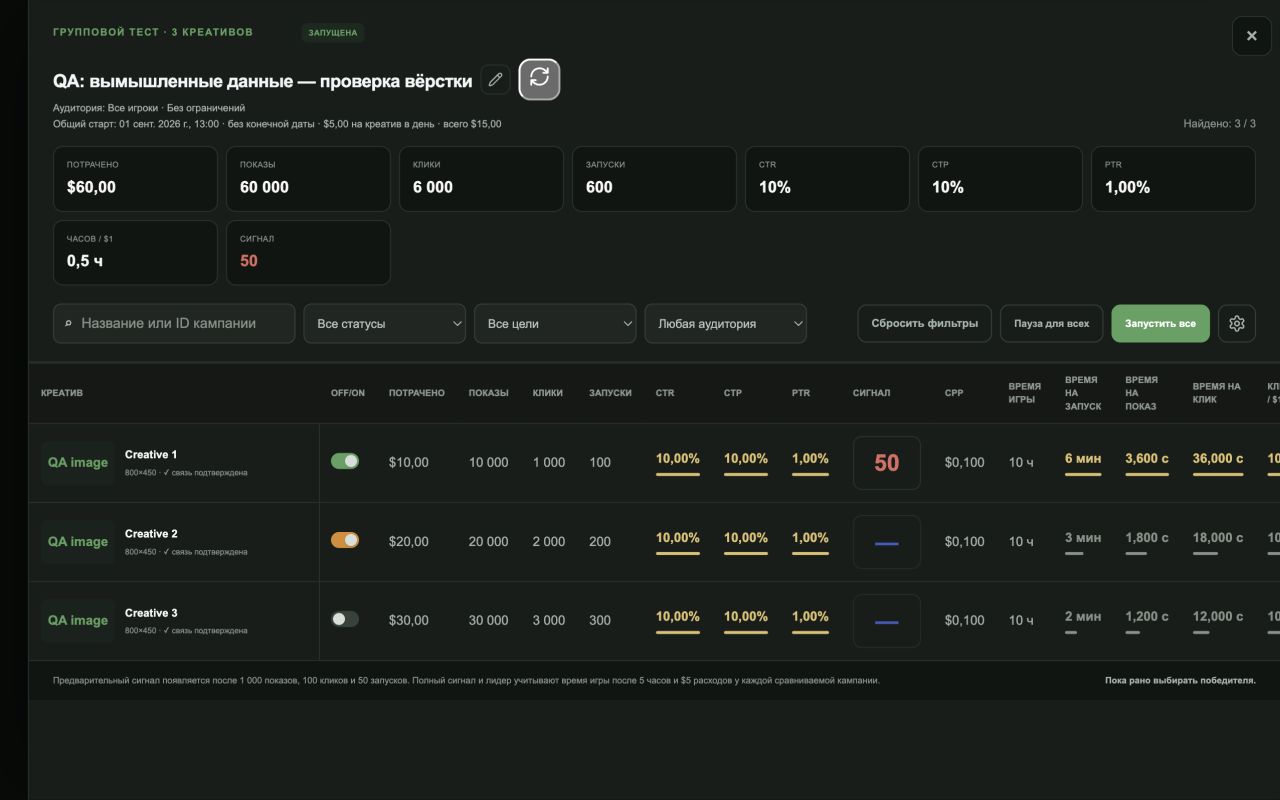
Ad attribution arrives after an event and can be revised later; compare matching windows. Impressions and clicks are normally available sooner, while plays, playtime and earnings can take up to 48 hours to settle. The audience switch is always open: All users, New and Returning are visible together, with the active option highlighted. Stored results remain visible during delays. For campaigns absent from the Analytics API breakdown, MARPLA sends one batched request for their exact Campaign IDs to Ads Manager and sums the returned ad metrics within each campaign. Creative-level reporting is not required. Table order is Off/On, spend, impressions, clicks, plays, CTR, CTP and PTR, followed by the remaining metrics. CTP is plays ÷ clicks; PTR is plays ÷ impressions. Hover a column name to see its definition and formula. Drag any column header except the pinned creative or campaign name; the chosen order is saved in this browser. Signal 0–100 is a comparative MARPLA model for the current period, not a Roblox rating. The final signal weights playtime hours per $1 at 40%, PTR at 30%, CTR at 18% and CTP at 12%. A row enters the comparison after 1,000 impressions, 100 clicks and 50 plays. Until every compared row has at least 5 hours of attributed playtime and $5 of spend, playtime is excluded from all signals together and the preliminary score uses conversions only. Red means an insufficient sample, yellow a preliminary conversion-only estimate, green a fully comparable signal and gray missing exact Roblox data. Small samples are additionally shrunk toward the comparison cohort. Group totals always use summed source values. In a group test, each row uses its campaign's only creative as the label and preview while the numbers cover that entire campaign. Data from a neighboring campaign or the group's aggregate is never substituted.
Columns, states and group total
Inside a creative test group there are no separate Goal / audience or Status columns: delivery state is carried by the Off/On switch. Gray means the campaign is off, green means it is on, and orange means it is on while Roblox moderation is in progress. The advertising overview also omits a separate status column; Goal / audience is the final draggable column. Signal cells show only a number: green is the full playtime-aware signal, yellow is the preliminary conversion-only signal, red is a small sample, and a gray dash means Roblox has not supplied exact source data. Within a group, Hours / $1 and ROI split the campaigns into a green upper tier, yellow middle tier, and red lower tier; both the number and proportional bar use that color. Group totals are ordered as spend, impressions, clicks, plays, CTR, CTP, PTR, hours / $1, and signal. The total signal is the impressions-weighted mean of available campaign signals and keeps the least reliable confidence level represented in the group.
Campaign settings
- Budget
- Per-campaign and set-wide limits are different amounts. With multiple creatives, check how many campaigns will be created.
- Duration
- A new group test defaults to no end date. You can select a limited duration manually before launch.
- Creatives & moderation
- A group test can contain 2 to 30 creatives. MARPLA stores each new creative's original image in protected storage and serves it through a stable internal preview. For existing creatives, the service restores the image from Roblox Asset Delivery and caches the result, so a temporary or stale Roblox thumbnail URL no longer becomes a white tile. If neither the original nor a ready thumbnail is available yet, MARPLA shows a neutral fallback instead of a broken image. Saved creatives can be manually removed from the library with confirmation without deleting the Roblox asset or campaign history. Roblox handles moderation during the advertising process; MARPLA cannot promise approval or review timing.
- Impressions / plays / spending
- Compare results for the same period. Ad reporting may lag; missing data does not mean no spending.
- Payment
- The payment account and charges are handled by Roblox. MARPLA does not show bank-card numbers. Creating a campaign may begin spending its budget.
Ads API cooldown
Background Ads refreshes only a due range: short ranges at most every 15 minutes, 30 days hourly, 6 months every 6 hours, and one year or all time daily. A Roblox 429 is not retried repeatedly inside one refresh. MARPLA keeps the complete Retry-After, never truncates a long pause, and does not let a manual click or generic failure shorten an already scheduled interval. The last confirmed report stays visible until a successful response.
Shared cooldown for one Ads key
A Roblox Ads cooldown applies to the connected key across every game, browser tab and MARPLA server process. Requests using one key pass one at a time through a shared gate, so parallel tabs cannot create a request burst; a different key continues independently. After a 429 or another failed response with Retry-After, no further Ads request using that key is sent before Roblox's exact time, and a shorter late response cannot reduce the stored cooldown. Creating and closing group tests uses the same protection. MARPLA does not automatically retry campaign-changing operations after an ambiguous network or server failure, preventing duplicate changes.
Campaign continuity during partial responses
The main table always keeps standalone campaigns and creative test groups together. Roblox Ads' experimental list may temporarily omit an existing campaign or return a row without a Universe ID. MARPLA does not delete a stored campaign in that case: it collects known Campaign IDs from groups, exact creative relations, recent reports and hidden-row state. Those stored campaigns and their last campaign-level figures are reconstructed as soon as the page opens, even while a fresh Roblox sync is temporarily unavailable. During the next successful update, MARPLA refreshes their official status and campaign-level report directly by Campaign ID.